Scrapbook MAX! offers help when you need it in the form of “mini” custom scrapbook tutorials in our context specific Help File as well as a comprehensive User’s Guide – both right within the software! You’ll find advice, troubleshooting, tips and tricks in the following places:
Scrapbook MAX! Software – Built-in Scrapbook Tutorials for You!
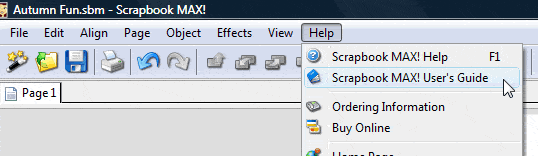
The Scrapbook MAX! User’s Guide
The user’s guide was written to give you an overview of the most important features of Scrapbook MAX! and how to use them. We take you through an entire project from start to finish and acquaint you with the main features, tips and tricks in Scrapbook MAX!. We’ve included lots of screen shots for “at-a-glance” explanations.
To access the User’s Guide in the Scrapbook MAX! design space, simply choose Help > Scrapbook MAX! User’s Guide.
Help buttons on Dialog Boxes
As you work with Scrapbook MAX!, you’ll notice that on virtually every dialog box that pops up, a Help button is available. Click this button if you need more information about the particular task that you are trying to perform.
The Help File
Included right inside Scrapbook MAX!, the Help File contains detailed entries explaining the program’s many features, including a ton of great tips.
The Help File is context specific, meaning that when you open it, it will automatically present the entry relevant to whatever you happen to be working on. Of course, the Help File is also fully searchable, so you can enter a topic or keyword to locate the information you need.
To access the Help File, choose Help > Scrapbook MAX! Help from the menu or click on the “question mark” icon in the tool bar.