
In this color matching tutorial, we’re going to show you how to use the eye-dropper “color picker” in Scrapbook MAX!. You can activate the eye-dropper and choose a color from your page whenever you are presented with a color selection box.
We’re going to colorize the black caption text in the page below with the eye-dropper so that it takes on the exact color of the “apple” embellishment. Remember: You can use the eye-dropper to select a color whenever you see the color selector box.
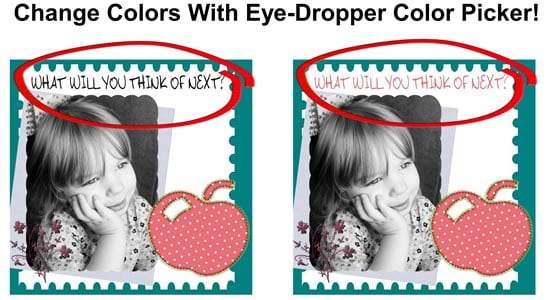
Step by Step Color Matching Tutorial Using the Eye-Dropper “Color Picker”
Step 1. On the Caption Properties, click the arrow on the color selector box.

Step 2. Choose More Colors.
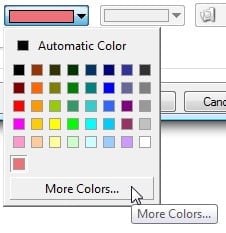
Step 3. Move your mouse to select a color from your page as shown here (we’re selecting the pink shade of the stitched apple embellishment). Notice how the cursor turns into an eye-dropper:
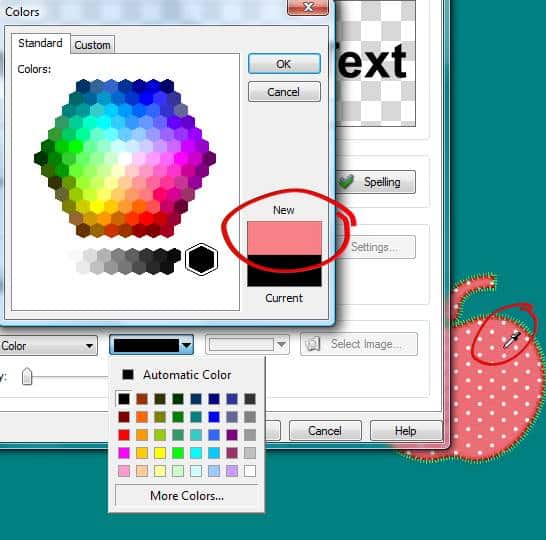
Step 4. Click your mouse, and the eye-dropper grabs this color to colorize your object (in this case, our caption)!

The eye-dropper tool is a great way to achieve a consistent, harmonious feeling between text and images in your layouts. Choosing just the right blue or red can make an incredible difference, and the eye-dropper tool lets you be precise. You’ll find the eye-dropper tool wherever you see the More Colors button on Scrapbook MAX! dialog boxes. Look for it when you’re working with Caption Text, Journal Text, Ribbon Text.